
무슨 프로젝트 하나 하려는데 이렇게나 걸림돌이 와장창
암튼 많은 일이 있었다. 길지 않은 개발 기간으로 인해 그냥 html로 작업하기로 결정했었다가
아무래도 모바일 어플리케이션으로 해야되다보니 다시 react native를 쓰는 걸로 확정이 되어서..
다시 잡게 되었다. 물론 1일차 때 썼던 프로젝트 생성 방법은 다 잊었지^0^
그래도 기록을 해 둬서 다행이다!
하지만.. 곧 두번째 시련이 닥쳤으니
프로젝트 생성을 하고보니 확장자가 app.tsx로 되어있는 게 아닌가.
전 타입스크립트 따위 모른단 말입니다.
그래서 또 폭풍 검색
방법은 의외로 간단했다.
1. 확장자를 .js로 바꾼 후 구문을 수정한다.
[ App.js ]
import React from 'react';
import { View, Text } from 'react-native';

const App = () => {
  return (
    <View>
      <Text>Hello, JavaScript!</Text>
    </View>
  );
};

export default App;
그랬더니 이젠 View, Text 저 부분이 지랄을 한다.
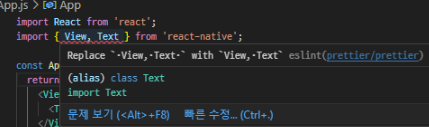
그래.. 한 번만에 될 리가 없지.
일단 무시하고 2번으로 넘어기로 한다.
2. TypeScript 의존성 제거
1) TypeScript 관련 패키지 제거
| bash |
| npm uninstall typescript @types/react @types/react-native |
2) babel.config.js 파일 수정
module.exports = {
  presets: ['module:metro-react-native-babel-preset'],
};
일단 설정은 여기까지가 끝이고,
아까 1번 설정하다가 지랄난 부분을 고쳐보기로 한다.
G선생은 ESLint와 Prettier 설정이 잘못됐으니 바꿔보라함
[ .eslintrc.js ]
module.exports = {
  extends: ['eslint:recommended', 'plugin:react/recommended', 'prettier'],
  rules: {
    'prettier/prettier': ['error', { singleQuote: true, parser: 'flow' }],
  },
  settings: {
    react: {
      version: 'detect',
    },
  },
};
[ .prettierrc ]
{
  "singleQuote": true,
  "trailingComma": "all",
  "arrowParens": "avoid"
}
그리고 ESLint와 Prettier 플러그인도 설치해 준다.
| bash |
| npm install --save-dev eslint prettier eslint-plugin-prettier eslint-config-prettier eslint-plugin-react eslint-plugin-react-hooks |
그랬더니 터미널이 이번엔 왕 큰 에러를 선물해 줬다.
| npm error code ERESOLVE npm error ERESOLVE unable to resolve dependency tree npm error npm error While resolving: interviewlab@0.0.1 npm error Found: prettier@2.8.8 npm error node_modules/prettier npm error dev prettier@"2.8.8" from the root project npm error npm error Could not resolve dependency: npm error peer prettier@">=3.0.0" from eslint-plugin-prettier@5.1.3 npm error node_modules/eslint-plugin-prettier npm error dev eslint-plugin-prettier@"*" from the root project npm error npm error Fix the upstream dependency conflict, or retry npm error this command with --force or --legacy-peer-deps npm error to accept an incorrect (and potentially broken) dependency resolution. npm error npm error npm error For a full report see: npm error C:\Users\june\AppData\Local\npm-cache\_logs\2024-07-05T16_11_39_356Z-eresolve-report.txt npm error A complete log of this run can be found in: C:\Users\june\AppData\Local\npm-cache\_logs\2024-07-05T16_11_39_356Z-debug-0.log |
ㅎㅎㅎㅎ
따졌더니 Prettier , ESLint 각각 최신버전 설치하라 함
| bash |
| npm install --save-dev prettier@latest |
| bash |
| npm install --save-dev eslint-plugin-prettier@latest eslint-config-prettier@latest |
그리고 각각 js 파일 구문도 다시 수정한다.
.exlintrc.js
-------------------------------------------------------------------------------

module.exports = {
  parserOptions: {
    ecmaVersion: 2020,
    sourceType: 'module',
    ecmaFeatures: {
      jsx: true,
    },
  },
  extends: [
    'eslint:recommended',
    'plugin:react/recommended',
    'plugin:prettier/recommended',
  ],
  rules: {
    'prettier/prettier': ['error', { singleQuote: true, trailingComma: 'all' }],
  },
  settings: {
    react: {
      version: 'detect',
    },
  },
};
.prettierrc
------------------------------------------------------------------------------------
{
"singleQuote": true,
"trailingComma": "all"
}
파일을 save 한 후, npm 다시 install
| bash |
| npm install |
끝났으면 vs code 껐다가 다시 실행
그럼 쟈쟌- 에러는 해결되었다.
근데 벌써 기가 다 빨려서 프젝 시작하려니 급 기분다운됨.
잠시 쉬었다가 다시 해야지..............................
'■ 개발일지 > 2차프로젝트' 카테고리의 다른 글
| [RN] (해결)음성인식정리(react-native-voice 활용) (22) | 2024.07.23 |
|---|---|
| [react-native] 카드 나열하기 - FlatList (0) | 2024.07.08 |
| [react-native] HTML → 전환 시 주의사항 (0) | 2024.07.06 |
| 1일차 - React Native 시작하기 (0) | 2024.06.24 |